
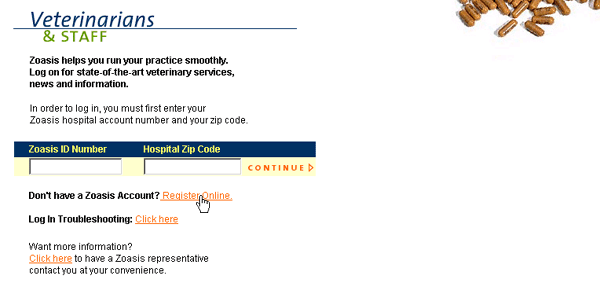
| If you do not yet have an active Zoasis account, you can register online from the Hospital Login page. Click on the Register Online link next to the phrase "Don’t have a Zoasis account?," as shown below. |
 |
| Next, enter the information for the user who will be the Clinic Administrator for your Zoasis account. The Clinic Administrator is granted access rights to change or create additional user accounts, update hospital information, and change user passwords. All information in the registration page is mandatory. |
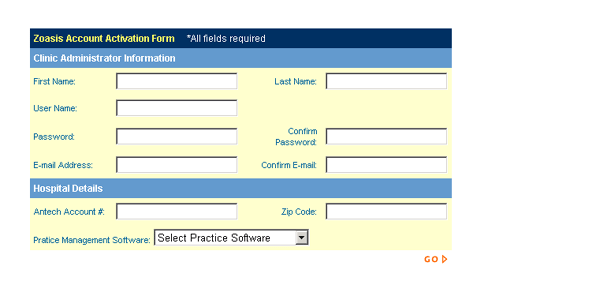 |
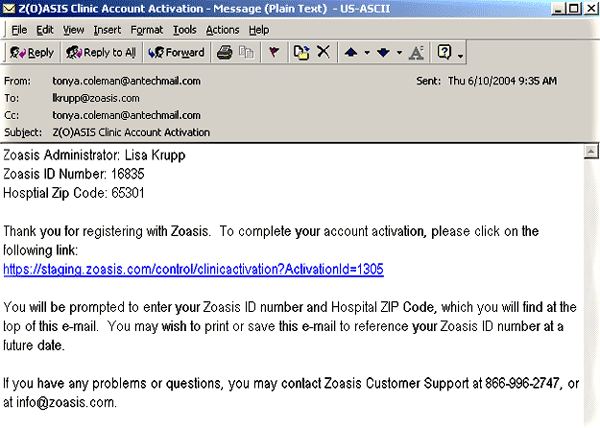
You can select a User Name and Password that will grant you access to your hospital’s data. The User Name and Passwords must be between 3 and 20 alpha-numeric characters (no spaces, symbols, or punctuation). Also, these fields are case sensitive – the way that you enter them in registration is exactly the way you will need to enter them each time you log into the Zoasis website. You must know your Antech Account number and ZIP code in order to complete the registration. If these two numbers do not match each other, and match the data on file from Antech, your registration will not be completed. If you encounter this error, you should contact your Antech account manager for assistance. Once you have completed the registration form, click GO. If all data fields are valid, an e-mail will be sent to the address that you provided. This e-mail will contain a link that you must click in order to complete the registration process. Your registration will only be completed if you click on this link – therefore, you must provide an address at an e-mail account to which you have access. A sample e-mail appears below. |
 |
| Back to Log-In Help |
